The business case for digital accessibility

Yamila FigueroaWebxya

Digital accessibility is more than a compliance requirement. It can reduce rework, strengthen product quality, extend reach and lower operational friction.
Introduction
Accessibility is often introduced into organizational conversations through risk. A legal requirement appears, a procurement process asks for evidence of conformance, an audit identifies barriers, or a client requests documentation that the team does not yet have. In those moments, accessibility can easily be framed as an obligation to satisfy rather than as part of how a digital product should be designed, built, and maintained.
That framing is understandable, but it is incomplete. Legal exposure and procurement requirements matter, and organizations should take them seriously. They are not, however, the only reasons to invest in accessibility, nor are they always the most useful reasons for securing long-term internal support.
For teams trying to make a business case for digital accessibility, the stronger argument usually comes from connecting accessibility to the way the organization already thinks about quality, reach, cost, risk, operations, and product sustainability. An accessible product can be easier to use across a wider range of situations. Accessible components can reduce repeated remediation. Clearer interaction patterns can lower support friction. Shared accessible standards can improve consistency across products. Earlier decisions can prevent accessibility debt from accumulating quietly until fixing it becomes expensive.
None of those outcomes should be reduced to a universal return-on-investment formula. Accessibility does not produce the same financial effect in every organization, and responsible strategy should resist claims that a particular percentage increase in conversion, revenue, or productivity will automatically follow. The more credible case is contextual. It asks what the organization is trying to achieve, where exclusion currently creates cost or risk, and how accessibility can contribute to better outcomes over time.
That commercial argument complements the broader case for inclusion. It does not replace it.
Accessibility is often framed too narrowly
For many organizations, accessibility first appears as a compliance topic. Someone asks whether the website meets WCAG, whether a public-facing service satisfies a procurement requirement, or whether the organization is exposed to legal risk. The conversation then becomes a checklist: audit the site, identify failures, fix them, and obtain whatever evidence is needed.
There is value in that process, but it can produce a narrow understanding of accessibility as something external to the product itself. The organization may treat accessibility as a layer applied after design and development rather than as one of the conditions that define whether the product works well.
This distinction matters because compliance work and product quality do not always align neatly. A website can pass many automated checks and still create significant barriers in real use. A product can technically include labels, focus indicators, and alternative text while remaining confusing, inconsistent, or difficult to navigate. As we explored in Accessibility Is More Than a Lighthouse Score, automated tools are useful, but they cannot substitute for understanding how people actually experience an interface.
A stronger organizational model places accessibility alongside usability, performance, maintainability, security, and content quality. It becomes part of the definition of a good digital product rather than a separate program that activates only when someone asks for proof.
That shift changes the business conversation. Instead of asking only, “What do we need to fix to comply?”, teams can ask, “Where is our current product excluding people, creating avoidable support work, or making future changes more expensive?”
Start with the cost of exclusion
The cost of exclusion is not always visible in a budget line.
Sometimes it appears as a person abandoning a form because an interaction cannot be completed with a keyboard. Sometimes it appears as repeated support requests because instructions are unclear or a status message is not announced by assistive technology. Sometimes it appears as inaccessible documents that have to be recreated manually whenever someone requests an alternative format.
In other cases, the cost is less immediate. A procurement opportunity may require accessibility documentation the organization does not have. A partner may expect a certain level of conformance. A redesign may uncover years of accumulated accessibility problems embedded in templates, components, and content practices.
These costs are difficult to summarize with one number because they occur across different parts of the organization. Some affect users directly. Others affect support teams, procurement, communications, development, legal review, or future project budgets.
That is why a useful business case starts by identifying where exclusion is already creating friction.
For one organization, the strongest evidence may be support tickets linked to inaccessible forms. For another, it may be the cost of remediating PDFs after publication. For another, it may be lost procurement eligibility, duplicated development effort, or repeated accessibility fixes across several websites that share the same underlying component.
The purpose is not to convert every barrier into a monetary value. It is to make exclusion visible enough that teams can compare the cost of continuing as they are with the cost of improving the system.

Exclusion begins as a barrier for a person trying to complete a task, but its effects can extend into support effort, remediation, procurement, and future project work.
Accessibility improves product quality
Accessibility often improves the product for reasons that are not limited to disability-specific scenarios.
Clear labels make forms easier to understand. Predictable navigation reduces cognitive load. Sufficient contrast improves readability in difficult lighting conditions. Captions support people who cannot or do not want to use audio. Large touch targets reduce input errors. Logical heading structures make long pages easier to scan. Error messages that explain what happened and how to recover help everyone complete a task more confidently.
These outcomes are not accidental side effects. They emerge because accessibility pushes teams to be more explicit about how information, interaction, and feedback are structured.
That makes accessibility closely related to product quality. It asks teams to remove assumptions about how a person sees, hears, understands, or operates an interface. In doing so, it often exposes weaknesses that would otherwise remain hidden until they become usability complaints.
This is especially important in products used under imperfect conditions. A person may be using a phone outdoors, working with one hand, navigating in a second language, dealing with temporary injury, or accessing a service on an older device. The boundary between disability-specific needs and broader usability conditions is not always as neat as organizations expect.
The business value here is not that every accessibility improvement will produce a measurable increase in revenue. The value is that accessibility provides a disciplined way to improve robustness, clarity, and usability across a wider range of real-world conditions.
Building accessibly reduces future remediation
Accessibility becomes expensive when teams repeatedly build barriers and then pay to remove them.
A color system with insufficient contrast may be embedded across dozens of templates before anyone questions it. A custom component without proper keyboard behavior may be copied throughout an application. A modal pattern that traps focus incorrectly can appear in several products because it came from a shared library. A document template may be used for years before the organization realizes that every publication created from it requires remediation.
Once these decisions spread, fixing them is no longer a local task. The organization has to identify every place where the pattern appears, update design and code, retest the behavior, revise documentation, and sometimes retrain teams.
That is why accessibility introduced early usually costs less than accessibility introduced late. The principle is similar to other forms of quality assurance: correcting a decision before it becomes infrastructure is easier than changing it after many products depend on it.
In Why Accessibility Should Be Part of Web Design from Day One, we looked at this from the perspective of the design and development process. The business implication is equally important. Early accessibility reduces the amount of future work dedicated to undoing previous decisions.
This does not mean every accessibility issue can be prevented. Products evolve, standards change, content is added, and new barriers can appear. The goal is not perfection at launch. It is to reduce the amount of predictable remediation created by the organization’s own processes.
Accessible patterns scale across products
The value of accessibility increases when good decisions are reusable.
If a team designs one accessible form field, documents it well, implements it correctly, and includes it in a shared component library, that investment can benefit every product that reuses the component. The same is true for navigation patterns, buttons, dialogs, alerts, tables, color tokens, focus states, and content conventions.
This is where accessibility and design systems become closely connected.
A design system does not guarantee accessible products, but it can reduce the number of places where the same accessibility decision has to be solved independently. Shared patterns can turn one piece of accessibility work into infrastructure rather than a one-off fix.
That leverage matters for organizations with multiple websites, campaigns, platforms, or external suppliers. Without shared standards, each project may interpret accessibility differently. Teams repeat testing, repeat mistakes, and spend time reconciling inconsistent implementations.
With a stronger system, the organization can establish defaults. Components can include accessible behavior. Design tokens can prevent known contrast problems. Documentation can explain how patterns should be used. Content guidance can clarify expectations for headings, links, alternative text, and error messages.
The result is not just consistency. It is a lower decision cost for every future project.
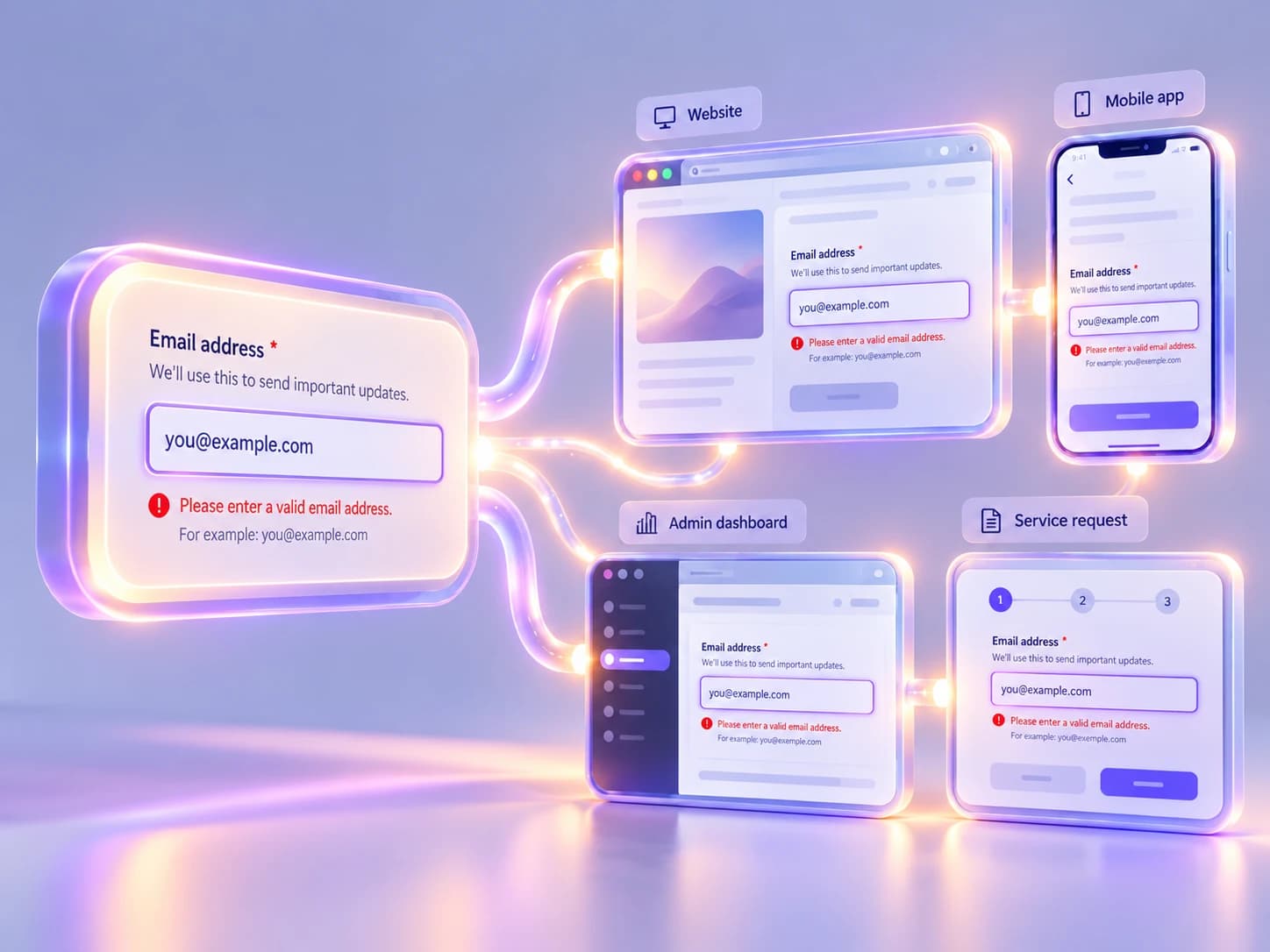
When accessible decisions become reusable patterns, one investment can improve many products instead of being repeated as separate remediation work.
Accessibility can reduce operational friction
Digital accessibility is often discussed as a property of the interface, but inaccessible products can create work elsewhere in the organization.
A confusing or inaccessible form can generate support emails. A document that cannot be used with assistive technology may require staff to provide information manually. An unclear error state can lead users to contact the organization because they do not know whether a transaction succeeded. A public service that is difficult to navigate can push people toward phone or in-person channels that cost more to operate.
Not every support request is caused by accessibility, and organizations should avoid overstating the relationship. But when patterns of friction appear repeatedly around the same digital tasks, accessibility can become part of the operational analysis.
This is particularly relevant for NGOs, nonprofits, public services, and organizations with small teams. A digital product that shifts unnecessary complexity onto support staff can consume capacity that would otherwise be used for program delivery, communications, or service improvement.
Accessibility work can therefore be evaluated partly through operational signals: fewer repeated clarification requests, fewer alternative-format interventions, fewer failed form submissions, clearer self-service completion, or lower dependence on staff to compensate for weaknesses in the interface.
The important point is not to promise operational savings in advance. It is to measure where accessibility improvements change the amount or type of support work required.
Legal and procurement risk still matter
A broader business case should not minimize compliance, legal exposure, or procurement requirements.
Accessibility obligations differ across jurisdictions, sectors, and types of organization. Procurement frameworks may require evidence of conformance. Clients may ask suppliers to meet specific accessibility standards. Public-sector contracts may include accessibility clauses. Regulatory expectations can influence what organizations are expected to document, test, and maintain.
These factors can make accessibility relevant even before a user encounters the product.
For organizations that sell digital services, compete for institutional contracts, or work with governments, multilateral organizations, universities, or large enterprises, accessibility can affect procurement readiness. A supplier that cannot explain its accessibility process may find itself responding reactively to requirements that competitors already treat as standard practice.
Risk also has a temporal dimension. Waiting until a formal requirement appears can force remediation under deadline pressure, when design and technical decisions are already difficult to change.
The business case here is not simply “avoid a lawsuit.” It is to reduce the uncertainty and cost associated with being unprepared when accessibility becomes a contractual, regulatory, or procurement condition.
The business case depends on your organization
There is no universal accessibility ROI.
An ecommerce platform, a humanitarian information service, a university, a nonprofit, a public institution, and an internal enterprise application do not create value in the same way. Their users, risks, revenue models, operational structures, procurement environments, and measures of success are different.
For a commercial service, accessibility may influence conversion, retention, customer satisfaction, or market reach. For a nonprofit, it may improve access to services, reduce support burden, strengthen funder confidence, or align delivery with organizational values. For a public institution, the strongest drivers may be equal access, legal obligations, service completion, and reduction of assisted-service demand.
The strongest business case therefore begins with the organization’s existing goals rather than with generic accessibility claims.
A useful way to structure that conversation is to connect organizational priorities with the contribution accessibility can make and the evidence that could be observed over time:
| Organizational goal | How accessibility can contribute | Evidence to measure |
|---|---|---|
| Improve completion of critical journeys | Reduce barriers in forms, navigation, authentication, and interaction | Completion rates, abandonment, usability findings |
| Reduce support friction | Make information, errors, and tasks easier to understand and operate independently | Support tickets, repeated questions, assisted-service demand |
| Lower remediation costs | Prevent inaccessible patterns from spreading through shared components and templates | Audit findings, remediation hours, recurring issue types |
| Strengthen procurement readiness | Establish documented standards, testing practices, and evidence of conformance | Procurement requirements met, accessibility documentation available |
| Reach more people effectively | Support a broader range of abilities, devices, contexts, and interaction methods | User research, task success, accessibility testing |
| Improve long-term maintainability | Reuse accessible components and documented patterns across products | Component adoption, repeated fixes, development effort |
This matrix is deliberately more cautious than an ROI calculator. It gives teams a way to connect accessibility to real organizational evidence without pretending that every benefit can or should be reduced to revenue.
How to build an internal case for accessibility
An internal accessibility case is strongest when it is specific enough to be recognizable.
Start with the digital experiences that matter most. Identify critical journeys, high-volume content, recurring support problems, procurement requirements, and known accessibility issues. The goal is to show where accessibility intersects with work the organization already considers important.
Then separate one-time remediation from structural improvement. Fixing a set of current issues may be necessary, but the longer-term case should explain how the organization will prevent the same problems from returning. That may involve design standards, reusable components, testing practices, content guidance, procurement criteria, training, or ownership.
It is also useful to define evidence before the work begins. If the organization expects accessibility improvements to reduce support friction, identify which support signals will be monitored. If the goal is to reduce repeated remediation, track recurring issue types and the effort required to correct them. If procurement readiness matters, define what documentation or conformance evidence is currently missing.
Finally, keep the case proportionate. Not every organization needs a large accessibility program, a dedicated team, or an enterprise governance model. The investment should reflect the scale of the digital ecosystem, the importance of the services being provided, and the risks created by exclusion.
Accessibility becomes easier to sustain when it is connected to the way the organization already makes decisions. It should influence how products are designed, how suppliers are selected, how shared components are maintained, how content is published, and how quality is evaluated over time.
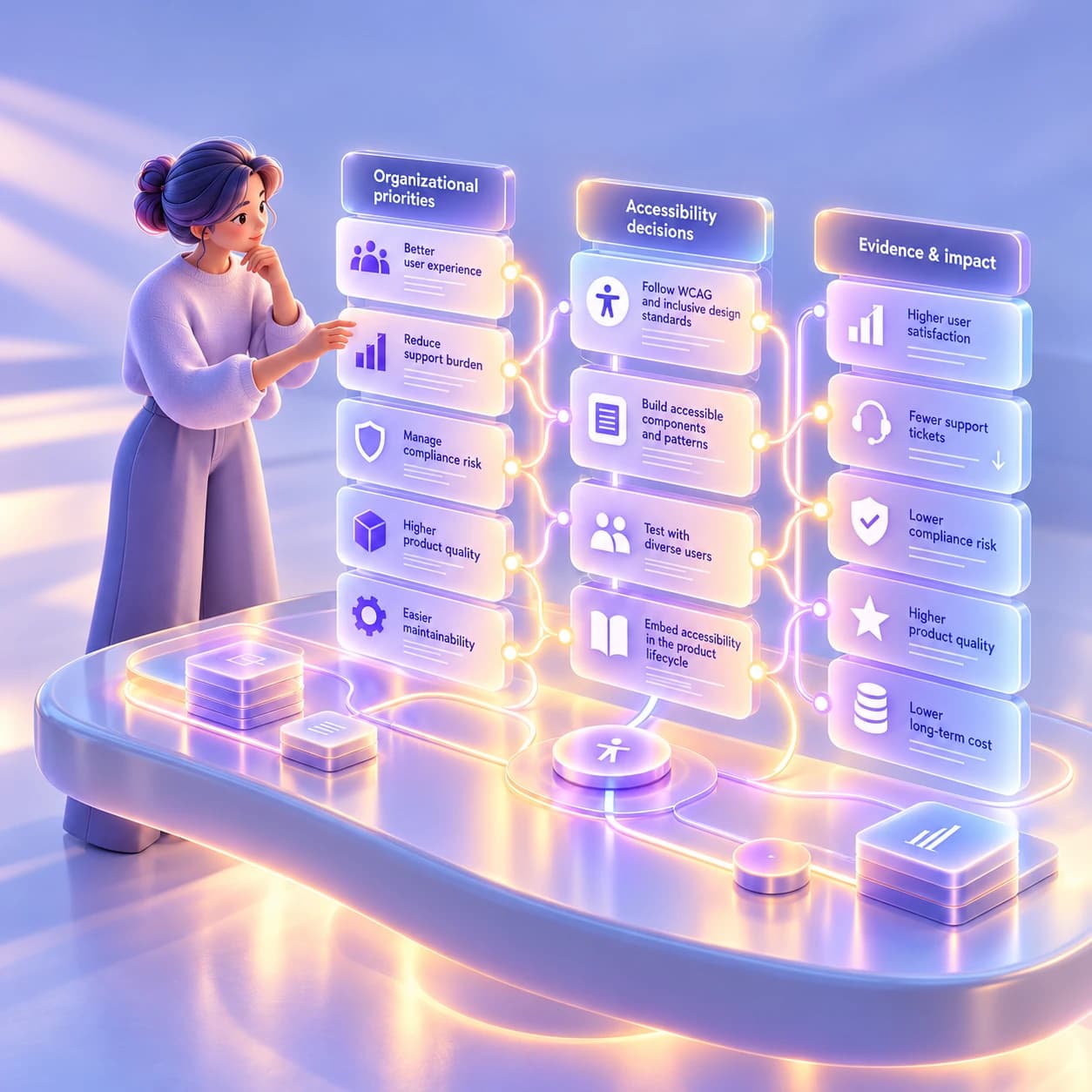
The strongest internal business case connects accessibility to the goals, risks, costs, and evidence that already matter to the organization.
The commercial case for accessibility is therefore not a replacement for the ethical one. People should not need to prove their financial value before they can use a digital service. But organizations still make decisions through budgets, priorities, risk assessments, procurement processes, and operational constraints. Accessibility becomes more durable when it is understood within those systems rather than treated as an isolated requirement.
A mature accessibility strategy does not promise that every improvement will generate the same return. It asks a more useful question: where is exclusion making the product less effective, more expensive to maintain, harder to operate, or riskier than it needs to be?
Once an organization can answer that question with evidence, accessibility becomes much easier to prioritize as part of ordinary digital strategy.
Keep reading

NGOs do not need to solve every accessibility issue at once. Start with critical services, set a baseline, stop creating new barriers and build a roadmap.

Accessibility
Accessibility debt: the problem nobody talks about
Accessibility debt builds up when an inaccessible decision repeats across components, content, code and processes. The longer it spreads, the more it costs.
If these challenges sound familiar, let’s talk about your context.
Start a conversation